Introduction
The Torry Harris Marketplace™ is an advanced online marketplace designed to help enterprises optimize, monetize, and accelerate their digital transformation efforts.
The Torry Harris Marketplace™ platform offers reliable functionality for business operations and integrates with popular business tools, enabling firms to centralize their operations and manage their business their way. It is a user-friendly, multi-seller platform that allows users to centrally store and manage their items and services, including data related to campaigns, promotions, user activity, and shipping. The platform streamlines the procurement process, making it easier for businesses of all types to manage operations. It supports business-to-business (B2B), business-to-individual (B2I), and business-to-consumer (B2C) engagements.
Target Audience
This documentation is intended for Store Administrators, Vendors, Developers, and Marketplace Customers who interact with the Torry Harris Marketplace™. Each section provides role-specific guidance to help users effectively configure, manage, publish, and consume marketplace offerings.
Marketplace Lifecycle Overview
The Torry Harris Marketplace™ supports the complete lifecycle of marketplace operations, including store configuration, vendor onboarding, catalog creation, product publishing, customer discovery, transaction processing, fulfillment, and post-purchase engagement.
Architectural Overview
The architecture supports platform owners, store owners, vendors, and customers, using a modular, role-based design. It integrates management portals, a centralized backend, and customer-facing storefronts, prioritizing scalability, security, and user experience to enable efficient management, personalized interactions, and seamless transactions.
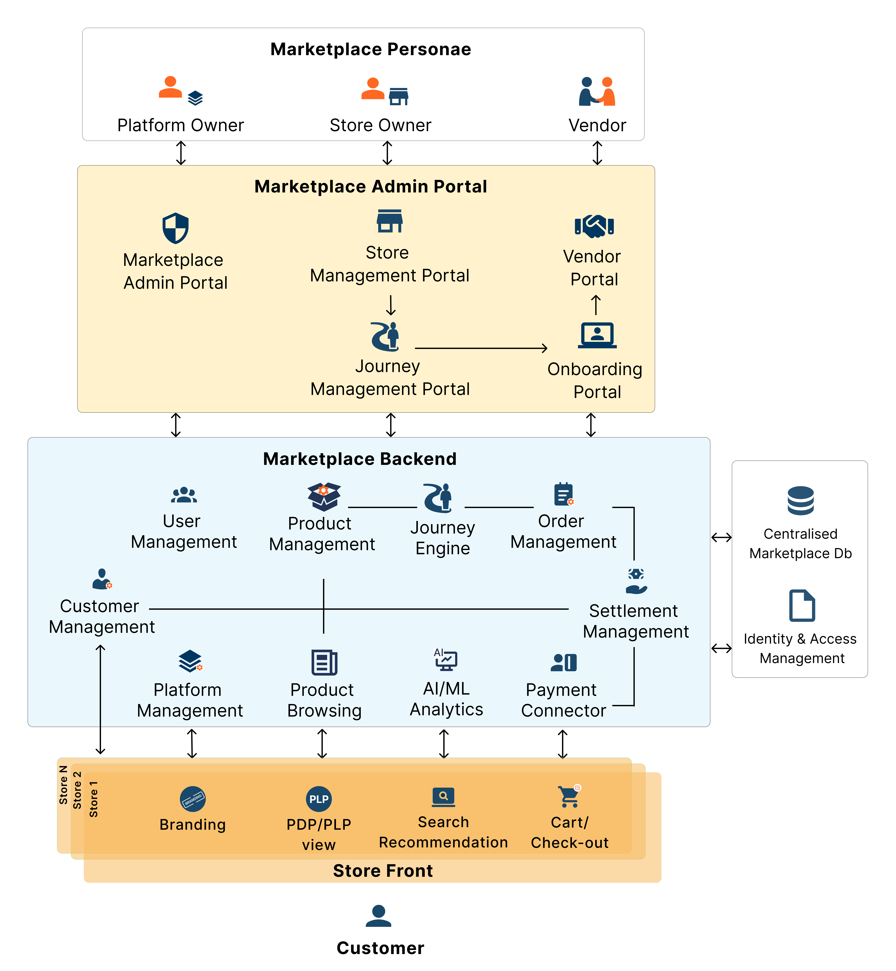
Layered Architecture
The architecture follows a clear, logical layered approach, focusing on specific responsibilities for modularity, scalability, and ease of maintenance:
-
Marketplace Personae Defines key stakeholders:
- Platform Owner: Oversees overall marketplace governance and configuration.
- Store Owner: Manages store-level operations, catalog governance, and vendor relationships.
- Vendor: Publishes products, manages inventory, pricing, and order fulfillment.
- Customer: Discovers, evaluates, and purchases products or services through storefront experiences.
-
Marketplace Admin Portal Provides tools for administrative tasks such as:
- Store management
- Vendor operations
- Onboarding processes
- Journey management
-
Marketplace Backend Core functionality, including:
- User management
- Product management
- Order management
- AI/ML analytics
- Payment and settlement management
- Enquiry management
- Review moderation
- Notification services
- Workflow/Journey engine
-
Store Front The customer-facing layer includes:
- Product browsing and search
- Product details and recommendations
- Streamlined cart and checkout
-
Centralized Database
Ensures data consistency and integrates with Identity & Access Management for secure, role-based access control.
Key Features
-
Role-Based Design
Supports role-specific interactions for Platform Owners, Store Owners, and Vendors, ensuring clarity and security. -
Modular Components
Allows for independent scaling and the integration of new features without affecting existing systems. The Admin Portal and Store Front are decoupled but interact through the Backend. -
Customer-Centric Approach
Optimized for seamless user experience, including:- Personalized search and recommendations
- Consistent branding experience
- Simplified cart and checkout
-
AI and Analytics
Uses AI/ML for enhanced product recommendations, search functionality, and analytics. -
Scalable and Secure Horizontal scalability for multiple stores and vendors. Centralized Identity & Access Management ensures secure, role-based access control.
Core Components of the Torry Harris Marketplace™
The Torry Harris Marketplace™ is built around four core components:
- Admin Portal
- Store Management Portal
- Onboarding Portal
- Vendor Portal
- Storefront
- Buyer Portal
Admin Portal
The Admin Portal provides a comprehensive suite of tools to manage and configure various aspects of your marketplace environment. It enables administrators to efficiently control store settings, manage users, customize language and currency options, and ensure secure operations through administrative controls.
With the Admin Portal, users can:
- Create, activate, and deactivate stores within the platform.
- Configure threshold settings to manage the number of stores that can be created and activated, ensuring optimal platform performance and governance.
- Add, edit, and delete multiple languages for each store, enabling a global reach with localized experiences.
- Set and modify default currencies for individual stores, providing flexibility in financial transactions.
- View payment options available for each store, ensuring that the platform supports a wide range of transaction methods.
- Access contact information of the Primary Platform Admin, including email and username, for support and collaboration.
- Create, update, disable, and delete Platform Admin users, managing the platform’s administrative structure.
- Transfer primary user roles between administrators to ensure continuity in platform management.
- Review and update platform policies and change passwords to maintain security and compliance.
The Admin Portal is designed to streamline administrative workflows, offering a secure, user-friendly interface to ensure that platform management is both efficient and effective.
Got it! Here is the revised version with the points ordered exactly as you've specified, following Microsoft Style Guidelines:
Store Management Portal
The Store Management Portal provides a comprehensive set of tools for administrators to effectively manage and configure store operations. It supports seamless product management, vendor oversight, payment configuration, and operational settings, offering a streamlined experience for both vendors and customers.
With the Store Management Portal, users can:
- Review, approve, or reject product creation requests.
- Review, approve, or reject product template creation requests.
- Add, edit, or delete categories.
- Create, edit, approve, deprecate, or retire product templates.
- Create new versions of existing product templates.
- View, unpublish, approve, reject, or retire products.
- Configure related products to enhance product associations.
- View order details to track and manage orders.
- Generate settlements, and edit settlement cycle dates and journeys to ensure accurate financial tracking and reconciliation.
- Settle payments to vendors, ensuring timely and accurate transactions.
- Edit, activate, or deactivate vendors, streamlining vendor management and operational control.
- Create, update, activate, deactivate, or delete coupons (vouchers) to manage promotions and discounts.
- Onboard vendors and customers, ensuring smooth account registration and onboarding processes.
- Update store settings, customizing the store environment to meet operational requirements and business needs.
- Activate, deactivate, revise, approve, deprecate, or retire product type versions, allowing for flexible management of product catalogs.
- Create new versions of product types to keep the product offerings fresh and relevant.
- Add, update, or delete languages to support global reach and localized customer experiences.
- Update product layout to improve product presentation and user interface design.
- Create usage policies for vendors and customers, establishing clear guidelines for platform interactions.
- Add, update, or delete attribute groups to better manage and categorize product information.
- Configure payment gateways and payment types (e.g., COD, Stripe, Cashfree), offering flexibility in transaction methods.
- Add, edit, or delete users to manage access and permissions within the store environment.
- Promote another user to primary user (by the current primary user) to ensure continuity in administrative control.
- View policies and change passwords to maintain security and compliance across the portal.
The Store Management Portal is designed to provide store administrators with a comprehensive, user-friendly interface, ensuring a secure and efficient environment for managing store operations and enhancing the overall vendor and customer experience.
Vendor Portal
The Vendor Portal is purpose-built for vendors to manage their product catalogs, pricing, inventory, and orders within the marketplace. It provides vendors with a self-service interface to streamline their onboarding, publishing, and fulfillment processes.
Key capabilities include:
- Submit product creation requests to store owners for approval.
- Manage inventory for listed products, including stock levels and availability.
- Add or update pricing details, including standard, promotional, and bulk pricing.
- Manage product visibility and publishing status.
- Track and fulfill orders, including real-time updates on order status.
- Respond to customer reviews and ratings to improve product trust and reputation.
- View performance analytics such as product views, conversions, and sales trends.
- Manage delivery timelines, shipment tracking, and returns (if applicable).
- Access communication tools to collaborate with store administrators or customers.
- Edit vendor profile, upload certificates, and maintain compliance documentation.
Store Front
The Store Front is the customer-facing layer of the marketplace, where end-users can explore, search, and purchase products or services. Each store has a customizable interface that reflects its branding, layout preferences, and product offerings.
Key customer-facing features include:
- Personalized homepages with banners, featured products, and dynamic content.
- Advanced search and filtering options to refine product discovery.
- Product Listing Pages (PLP) and Product Detail Pages (PDP) with detailed specifications, pricing, and multimedia support.
- Customer reviews and ratings to guide purchase decisions.
- AI-powered recommendations based on customer behavior and product relevance.
- Shopping cart and simplified checkout process with multi-payment support (e.g., COD, credit cards, online gateways).
- Customer account management, including order history, wishlist, profile settings, and saved addresses.
- Order tracking and delivery notifications for transparency and trust.
- Responsive design optimized for desktops, tablets, and mobile devices.
The Store Front ensures a seamless, intuitive shopping experience, tailored for both general and niche product categories, while supporting multi-vendor operations under a unified platform.
Key Benefits of Using the Torry Harris Marketplace™
- Centralized platform for discovering a wide range of products and services.
- Enhanced operational efficiency through a user-friendly interface for easy navigation and search.
- Seamless comparison of offerings to identify optimal pricing and value.
- Secure environment for transactions, ensuring data privacy and integrity.
- Real-time updates on product availability, pricing, and special offers.
- Customizable filters and search options to meet specific business requirements.
- Detailed product/service information, including specifications, reviews, and ratings, to aid in informed decision-making.
How to Use This Documentation
The documentation is organized by functional areas and user roles. Store Administrators to Store Management Portal guidance, Vendors to Vendor Portal workflows, and Customers to Storefront experience documentation. Navigation menus and search functionality can be used to quickly locate relevant topics.